Client Guide
Styling, custom events, widgets, tool lifecycle, and the SSE protocol for @neeter/core and @neeter/react
@neeter/react provides a drop-in chat UI — built on @neeter/core's framework-agnostic AgentClient — that connects to your @neeter/server backend over SSE.
Vanilla TypeScript (no React)
@neeter/core exposes the same AgentClient and Zustand store that @neeter/react uses internally. If you're not using React — or want full control over rendering — use it directly:
import { AgentClient, createChatStore } from "@neeter/core";

const store = createChatStore();
const client = new AgentClient(store, { endpoint: "/api" });

// Create a session and start listening for SSE events
await client.connect();
client.attachEventSource();

// Subscribe to state changes
store.subscribe((state) => {
  console.log("messages:", state.messages);
  console.log("streaming:", state.isStreaming);
  console.log("thinking:", state.isThinking);
  console.log("pending approvals:", state.pendingPermissions);
});

// Send a message
await client.sendMessage("Hello!");

// Stop the agent mid-turn
await client.stopSession();

// Respond to a tool approval
await client.respondToPermission({
  kind: "tool_approval",
  requestId: "req-123",
  behavior: "allow",
});

// Cleanup when done
client.destroy();
The store exposes all the same state that useChatStore() provides in React — messages, isStreaming, isThinking, streamingText, streamingThinking, pendingPermissions, totalCost, and more. Use store.getState() for one-off reads or store.subscribe() for reactive updates.
Custom events work the same way — pass onCustomEvent in the config:
const client = new AgentClient(store, {
  endpoint: "/api",
  onCustomEvent: (event) => {
    if (event.name === "preview_reload") {
      iframe.contentWindow?.location.reload();
    }
  },
});
See the vanilla-chat example for a complete working app.
Custom events (React)
If your server emits custom events (via onToolResult — see Server Guide), handle them with onCustomEvent:
<AgentProvider
  onCustomEvent={(e) => {
    if (e.name === "notes_updated") {
      myStore.getState().setNotes(e.value);
    }
  }}
>
  <Chat />
</AgentProvider>
Each event is a typed CustomEvent<T> with name and value fields.
Widgets
When you add tools to your SessionManager, neeter automatically renders them with purpose-built widgets — diff views for edits, code blocks for file reads, expandable link pills for web searches, and so on. No configuration needed.
- Built-in widgets — what ships out of the box for the 11 supported SDK tools, how approval previews work, and how to extend or override them
- Custom widgets — register your own components for MCP tools or app-specific rendering
Tool calls without a registered widget fall back to a minimal status indicator.
Tool call lifecycle
Each tool call moves through phases, reflected in WidgetProps.phase:
| Phase | Trigger | What's available |
|---|---|---|
pending | tool_start SSE event | input: {} |
streaming_input | tool_input_delta events | partialInput accumulates |
running | tool_call event (input finalized) | input is complete |
complete | tool_result event | result is JSON-parsed |
error | Error during execution | error message |
Styling
Neeter components use Tailwind v4 utility classes and shadcn/ui-compatible CSS variable names (bg-primary, text-muted-foreground, border-border, etc.).
With shadcn/ui
Your existing theme variables are already compatible. Add one line to your main CSS so Tailwind scans neeter's component source for utility classes:
@import "tailwindcss";
@source "../node_modules/@neeter/react/dist";
The @source path is relative to your CSS file — adjust if your stylesheet lives in a nested directory (e.g. ../../node_modules/@neeter/react/dist).
Without shadcn/ui
Import the bundled theme, which includes source scanning automatically:
@import "tailwindcss";
@import "@neeter/react/theme.css";
This provides a neutral OKLCH palette with light + dark mode support and the Tailwind v4 @theme inline variable bridge.
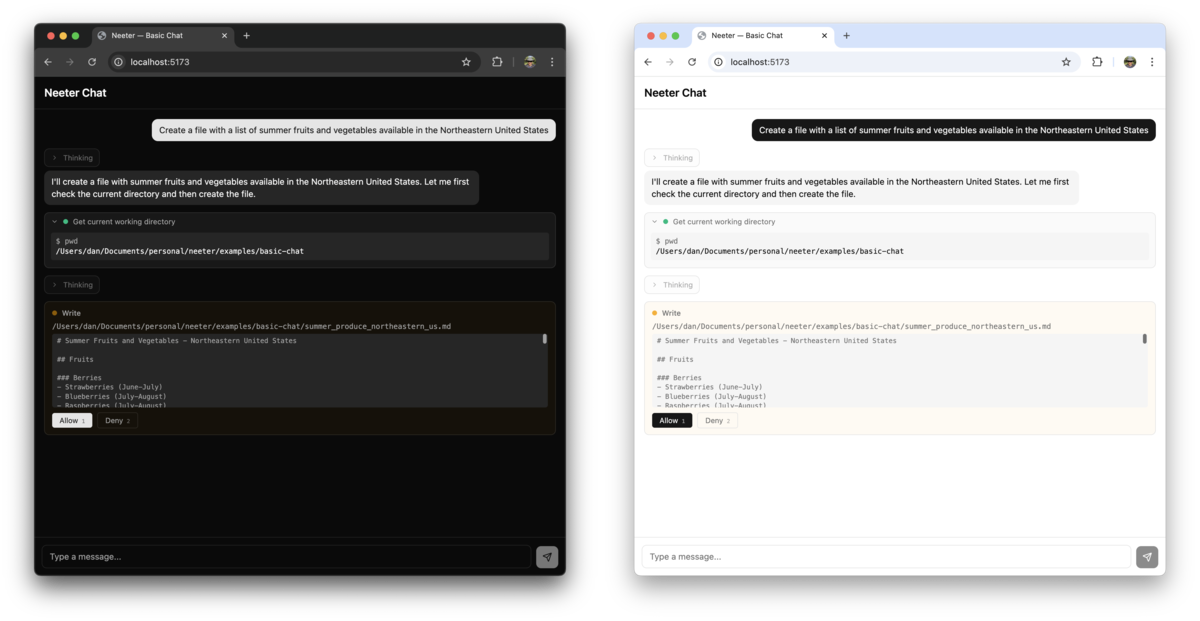
Dark mode
Dark mode activates via:
.darkclass on<html>(recommended), orprefers-color-scheme: darksystem preference (automatic)
Add .light to <html> to force light mode when using system preference detection.
Switching to shadcn later
Drop the @neeter/react/theme.css import and add @source — your shadcn theme takes over with zero migration.
SSE events
Events emitted by the server, handled automatically by useAgent (React) or attachEventSource() (vanilla):
| Event | Payload | Description |
|---|---|---|
message_start | {} | Agent began generating a response |
thinking_start | {} | Extended thinking block began |
thinking_delta | { text } | Streaming thinking text chunk |
text_delta | { text } | Streaming text chunk |
tool_start | { id, name } | Agent began calling a tool |
tool_input_delta | { id, partialJson } | Streaming tool input JSON |
tool_call | { id, name, input } | Tool input finalized |
tool_result | { toolUseId, result } | Tool execution result |
tool_progress | { toolName, elapsed } | Long-running tool heartbeat |
permission_request | PermissionRequest | Tool approval or user question awaiting response |
session_init | { sdkSessionId, model, tools } | SDK session initialized — provides the persistent session ID |
turn_complete | { numTurns, cost, stopReason, usage, modelUsage } | Agent turn finished with stop reason, token usage, and per-model costs |
custom | { name, value } | App-specific event from onToolResult |
session_error | { subtype, stopReason } | Session ended with error |