Server Guide
Endpoints, session context, permissions, thinking, persistence, and sandbox hooks for @neeter/server
@neeter/server gives you a Hono router that manages Agent SDK sessions and streams events to the client over SSE.
Endpoints
createAgentRouter mounts eight endpoints (default base path: /api):
| Method | Path | Description |
|---|---|---|
POST | /api/sessions | Create a session, returns { sessionId } |
POST | /api/sessions/resume | Resume or fork a session by SDK session ID |
GET | /api/sessions/history | List previous sessions |
GET | /api/sessions/replay/:sdkSessionId | Load persisted events for UI replay |
POST | /api/sessions/:id/messages | Send a message — text or multimodal content |
GET | /api/sessions/:id/events | SSE stream of agent events |
POST | /api/sessions/:id/permissions | Respond to a permission request (see Permissions) |
POST | /api/sessions/:id/abort | Abort the current agent turn |
System prompt
systemPrompt accepts a plain string or the Claude Code preset object. The preset includes built-in safety instructions, tool-usage guidance, and environment context — use append to layer on your own instructions:
// Plain string — full control, no built-in behavior
const sessions = new SessionManager(() => ({
  context: {},
  model: "claude-sonnet-4-5-20250929",
  systemPrompt: "You are a helpful assistant.",
}));

// Preset — Claude Code defaults + your additions
const sessions = new SessionManager(() => ({
  context: {},
  model: "claude-sonnet-4-5-20250929",
  systemPrompt: {
    type: "preset",
    preset: "claude_code",
    append: "You are a helpful assistant that can look up Pokémon.",
  },
}));
Extended thinking
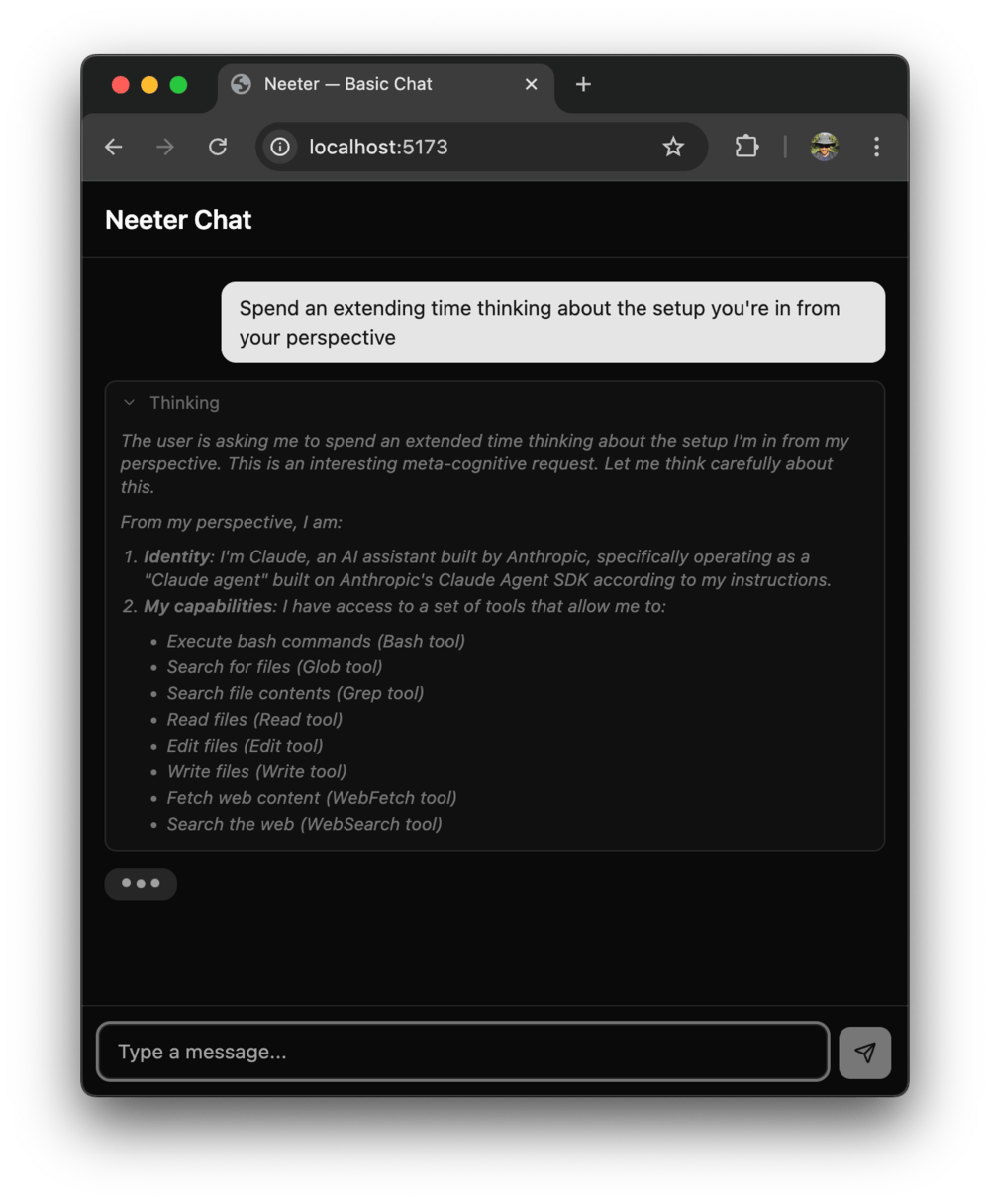
Enable Claude's chain-of-thought reasoning by setting thinking in your session config:
const sessions = new SessionManager(() => ({
  context: {},
  model: "claude-sonnet-4-5-20250929",
  systemPrompt: "You are a helpful assistant.",
  thinking: { type: "enabled", budgetTokens: 10000 },
}));| Config | Behavior |
|---|---|
{ type: "enabled", budgetTokens: N } | Fixed thinking budget — useful for cost control |
{ type: "adaptive" } | Let the model decide how much to think (Opus 4.6+) |
{ type: "disabled" } | Explicitly off (this is also the default) |
When thinking is enabled, the Agent SDK suppresses StreamEvent messages — the translator falls back to extracting text, thinking, and tool-use blocks from complete AssistantMessage objects. The client receives the same thinking_delta and text_delta SSE events either way, so components like MessageList and ThinkingBlock work without any special handling.
Multimodal messages
The messages endpoint accepts plain text or structured content arrays with text and image blocks:
# Plain text (unchanged)
curl -X POST /api/sessions/:id/messages \
  -d '{ "text": "Hello" }'

# Text + image
curl -X POST /api/sessions/:id/messages \
  -d '{
    "content": [
      { "type": "text", "text": "Describe this diagram" },
      {
        "type": "image",
        "source": {
          "type": "base64",
          "media_type": "image/png",
          "data": "<base64-encoded data>"
        }
      }
    ]
  }'
When content is provided it takes precedence over text. Supported image media types: image/jpeg, image/png, image/gif, image/webp.
On the server side, session.pushMessage() now accepts string | ContentBlock[]:
// Text-only (backward compatible)
session.pushMessage("Hello");

// Multimodal
session.pushMessage([
  { type: "text", text: "What's in this image?" },
  {
    type: "image",
    source: { type: "base64", media_type: "image/png", data: pngBase64 },
  },
]);
The extractText() helper pulls the text portion from either form — useful for display or logging:
import { extractText } from "@neeter/server";

extractText("Hello");                        // "Hello"
extractText([{ type: "text", text: "Hi" }]); // "Hi"
Session context
SessionManager takes a factory function that runs once per session. The generic type parameter lets you attach per-session state:
interface MyContext {
  history: string[];
}

const sessions = new SessionManager<MyContext>(() => ({
  context: { history: [] },
  model: "claude-sonnet-4-5-20250929",
  systemPrompt: "You are a helpful assistant.",
  mcpServers: { myServer: createMyServer() },
  allowedTools: ["mcp__myServer__*"],
  maxTurns: 100,
}));
The context is available in translator hooks (see below).
Reacting to tool results
Use onToolResult to inspect what the agent did and emit structured custom events:
const translator = new MessageTranslator<MyContext>({
  onToolResult: (toolName, result, session) => {
    if (toolName === "save_note") {
      session.context.history.push(result);
      return [{ name: "notes_updated", value: session.context.history }];
    }
    return [];
  },
});
Each returned { name, value } object is sent to the client as a custom SSE event. See Custom events for the client-side handling.
Permissions
By default sessions run with permissionMode: "default" — every tool call requires explicit browser-side approval. Set permissionMode to "bypassPermissions" to auto-approve all tools, or "acceptEdits" for a middle ground:
const sessions = new SessionManager(() => ({
  context: {},
  model: "claude-sonnet-4-5-20250929",
  systemPrompt: "You are a helpful assistant.",
  permissionMode: "bypassPermissions",
}));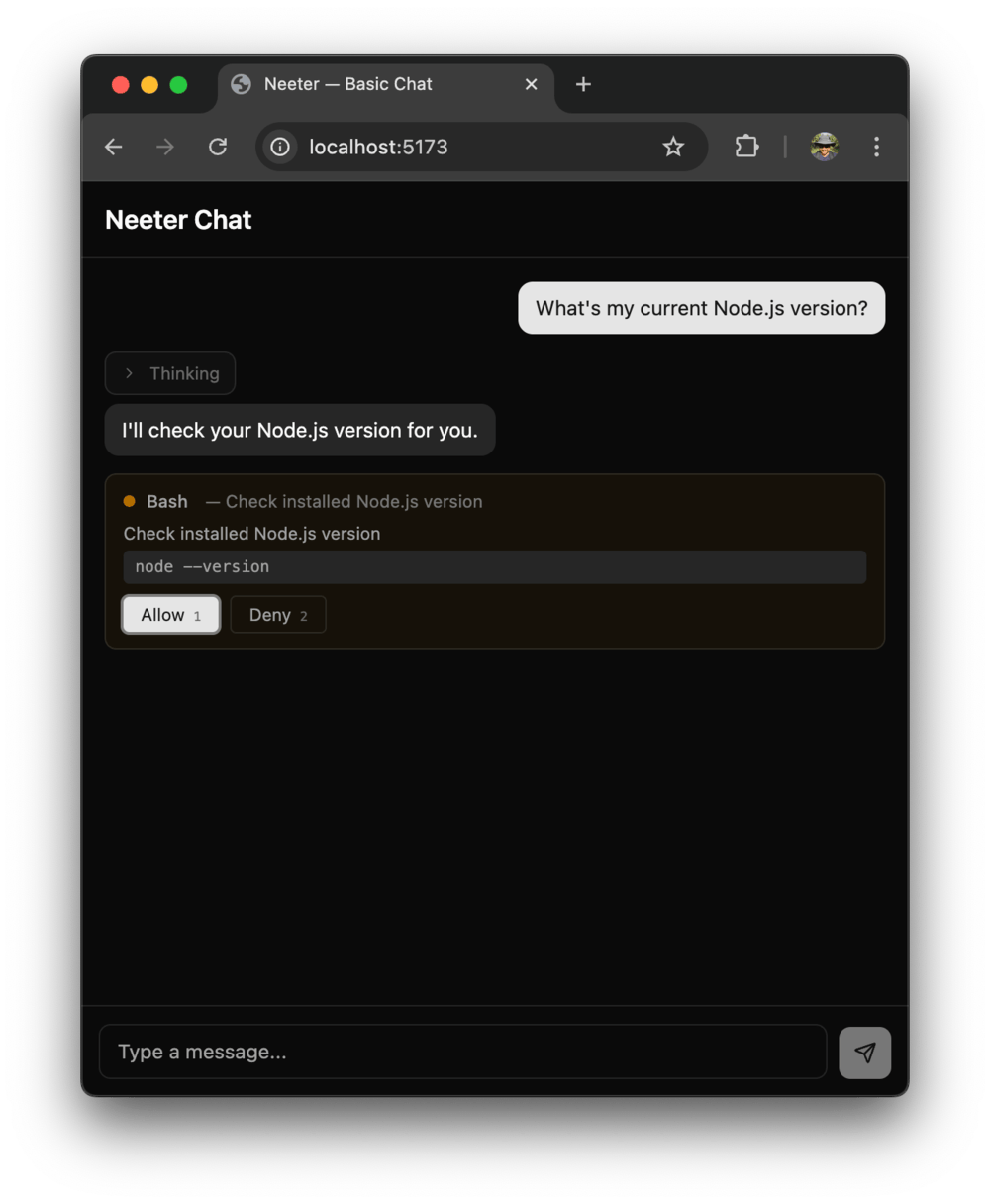
When permissionMode is not "bypassPermissions":
- Every tool call blocks the SDK until the user responds
AskUserQuestioncalls surface as structured questions with optionspermission_requestSSE events fire to the client- The user's response is POSTed back to
/api/sessions/:id/permissions
The PermissionGate on each session manages the deferred promises internally — no additional wiring needed.
| Mode | Behavior |
|---|---|
"bypassPermissions" | All tools auto-approved |
"default" | Every tool call requires explicit approval (default) |
"acceptEdits" | File edits auto-approved, other tools require approval |
"plan" | Planning mode — SDK-defined behavior |
Tools listed in allowedTools are pre-approved by the SDK and skip the permission prompt, even when permissionMode is "default". This lets you auto-approve safe operations while still gating destructive ones:
const sessions = new SessionManager(() => ({
  context: {},
  model: "claude-sonnet-4-5-20250929",
  systemPrompt: "You are a helpful assistant.",
  tools: ["Read", "Write", "Edit", "Glob", "Grep"],
  allowedTools: ["Read", "Glob", "Grep"],  // auto-approved
  // Write and Edit will still require browser approval
}));
Session resume & persistence

The Claude Agent SDK persists conversations on disk and supports resuming them. SessionManager captures the SDK-assigned session ID (delivered via a session_init SSE event) and exposes methods for resuming past sessions and browsing history.
In-memory history works out of the box — listHistory() returns sessions that are still in memory:
const sessions = new SessionManager(() => ({
  context: {},
  model: "claude-sonnet-4-5-20250929",
  systemPrompt: "You are a helpful assistant.",
}));
Persistent history survives server restarts. Pass a SessionStore implementation to the constructor:
import { createJsonSessionStore, SessionManager } from "@neeter/server";

const sessions = new SessionManager(
  () => ({
    context: {},
    model: "claude-sonnet-4-5-20250929",
    systemPrompt: "You are a helpful assistant.",
  }),
  { store: createJsonSessionStore("./data") },
);
createJsonSessionStore writes append-only JSONL event logs and JSON metadata sidecars to the given directory. On the client, replayEvents reconstructs the chat UI from stored events — the same store actions used by the live SSE stream, so rendering is identical.
The SessionStore interface is pluggable — implement save, load, list, and delete to back it with a database instead of the filesystem.
Security note:
createJsonSessionStorewrites conversation data — including tool inputs and outputs — to disk unencrypted. Use it for development and trusted environments. See the code-workbench example for a complete persistence setup.
Sandbox hook
createSandboxHook restricts file operations to a specific directory. It inspects file_path and path fields in tool input and blocks any resolved path that falls outside the sandbox:
import { resolve } from "node:path";
import { createSandboxHook, SessionManager } from "@neeter/server";

const sandboxDir = resolve("./sandboxes/user-123");

const sessions = new SessionManager(() => ({
  context: {},
  model: "claude-sonnet-4-5-20250929",
  systemPrompt: "You are a helpful assistant.",
  hooks: { PreToolUse: createSandboxHook(sandboxDir, resolve) },
}));
Bash is blocked by default — shell commands can reference paths outside the sandbox in ways that can't be reliably detected. Set { allowBash: true } only when using OS-level isolation (containers, VMs, or @anthropic-ai/sandbox-runtime).
See the code-workbench example for a complete sandboxing setup.
Introduction
A React + Hono toolkit that puts a browser UI on the Claude Agent SDK — the same agentic framework that powers Claude Code. Streams tool calls, file edits, permissions, and multi-turn sessions over SSE into ready-made React components.
Client Guide
Styling, custom events, widgets, tool lifecycle, and the SSE protocol for @neeter/core and @neeter/react